The three methods, defined
Part of the confusion is linguistic. "Blur" has become the generic verb for hiding anything in an image, so people say they blurred a plate when they pixelated it, and ask for a redaction when they mean a smudge. Underneath the shared word are three distinct operations.
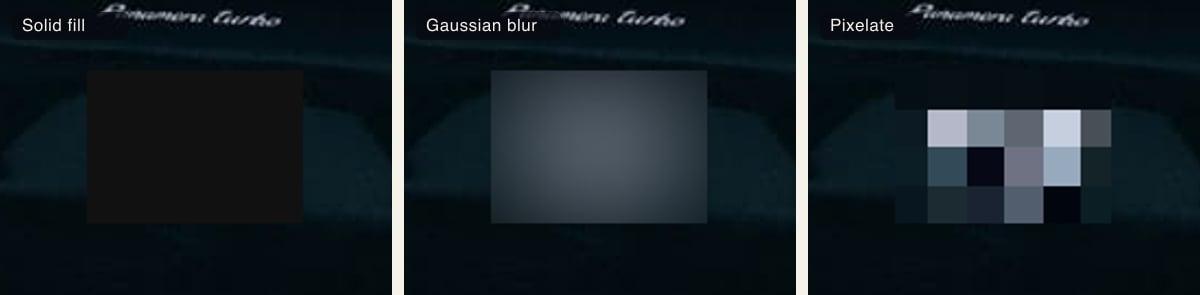
Redaction removes. The region is covered entirely with flat color — the black bar you've seen on documents — and the original pixels are gone rather than transformed. In Blurify this is the solid fill style, in black or any other color you pick.
Blur smooths. A gaussian blur averages each pixel with its neighbors across a radius, so detail dissolves into a soft gradient. The information isn't deleted so much as spread out, which is why it looks like a lens effect rather than a censorship mark.
Pixelation blocks. The region is divided into a grid and every cell is flattened to one average color, giving the hard mosaic look. Detail below the block size is discarded outright, and the bigger the blocks, the less survives.
Why gaussian blur can sometimes be reversed
A gaussian blur is a mathematical transform of the original pixels, not a deletion of them, and transforms can sometimes be run backwards. Deblurring is an active area of work, and weak blurs over small regions are the attackable case. A plate is a particularly bad candidate for a light blur: the character set is small, the layout is standardized, and the string is short, so a partial recovery narrows things down fast.
A strong blur over a small region is far safer than a light one, and in a casual photo it's usually enough. But pixelation and solid fill are categorically safer, because they throw information away instead of rearranging it. If you want a decision rule rather than a judgment call, that's the one.
One thing this comparison assumes: the edit has to be real. Blurify's exports are destructive pixel edits made when the image is re-encoded, never a CSS filter or an overlay layered over an intact original. A blur that lives in a stylesheet or an editable layer can be peeled off in seconds regardless of how strong it looks.
What publishers and dealerships actually use
Published photography leans on pixelation, and the reason is communication as much as safety. A mosaic block is unmistakably an editorial decision. Readers see that something was removed on purpose, which is exactly what a news photo wants to signal — a soft blur can be mistaken for a focus miss, and that ambiguity is unhelpful when the point is that a detail was withheld.
Dealerships tend to go one of two ways. Some never let the plate into the shot in the first place, using a branded plate cover or dealer plate during the photo session, which doubles as advertising. The rest fix it in post, and blur or pixelate every listing photo before it goes up. Both approaches end in the same place: a set of photos where no customer's registration is readable.
Which should you pick?
For a plate, solid fill or pixelate. Solid fill is Blurify's default for a detected plate and covers almost every case: flat color in, image data out, nothing left underneath to recover, and a small dark block doesn't look out of place in a listing or a social post. It's also the right choice when the photo is going somewhere you can't take it back from.
Pixelate when you'd rather the edit read as editorial than as a black bar. It's the convention in published photography, and because the block size sets exactly how much survives, a plate in a typical listing photo ends up as a handful of flat cells at the default strength — on a very high-resolution shot, turn the amount up or use solid fill.
For a photo where the censoring shouldn't dominate the frame, gaussian blur is fine. A background car, a plate in the far corner of a landscape shot, an image where a mosaic block would be the loudest thing in the picture — use blur, but use a strong one, and be aware you've traded certainty for appearance.
Whichever you choose, coverage matters at least as much as method. A heavy pixelation over a box that clips the last character is weaker than a moderate one over a box with a margin around the whole plate, because the visible fragment tells someone how long the string is and what part of it they still need. Size the region to the plate and its surround first, then argue about the style.
How detection-then-blur works
The order matters more than the style does. Google Cloud Vision locates the plate as a "Vehicle registration plate" object and hands back a tight bounding box, which appears on the canvas as a region you can confirm, resize or move. Nothing is applied yet at that point; you're still looking at the untouched image with a rectangle drawn on it.
The style is applied at export. When you download, the image is re-encoded with your chosen treatment written into the pixels inside the region, and the metadata — EXIF, GPS, camera details — is dropped. That's what makes the choice between pixelate, blur and fill a real one rather than a cosmetic preview setting.
Try it on a photo